

GPU utilization is all about one thing:
keeping your GPU busy doing useful work instead of waiting.
If your GPU is sitting idle, you’re wasting expensive hardware.
In this blog, we’ll break this down in a simple way and show you how to fix it.
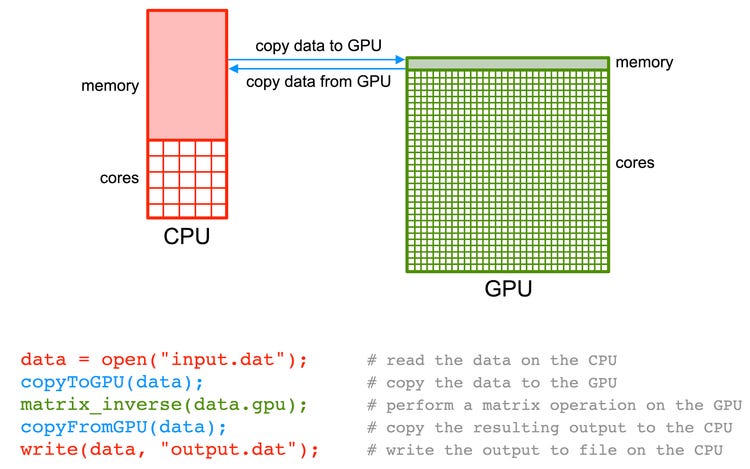
Understanding How a GPU Works
Whenever you run something on a GPU, three steps usually happen:
Data moves from CPU → GPU
GPU does the actual computation
Results move back from GPU → CPU
Your goal:
Make sure step 2 (compute) takes most of the time.
If your GPU is spending too much time waiting for data, utilization will be low.
Why GPU Utilization is Low
Here are the most common reasons:
1. CPU is too slow
If your CPU can’t feed data fast enough, the GPU just waits.
2. Slow data loading
Reading data from slow storage or doing heavy preprocessing can slow everything down.
3. Too much data transfer
Moving data between CPU and GPU repeatedly adds overhead.
4. Small batch size
If your batch is too small, the GPU never reaches full capacity.
5. Poor scaling
Using too many GPUs for a small problem can actually reduce efficiency.
6. Not GPU-friendly code
Some algorithms don’t work well on GPUs (e.g., too many branches or irregular memory access).
How to Improve GPU Utilization
Think of this in 3 simple buckets:
1) Feed the GPU Faster
Use multiple workers for data loading
Store data on fast storage (like NVMe)
Keep data close to the GPU
Avoid frequent disk writes (logs, checkpoints)
Goal: Remove bottlenecks before the GPU
2) Do More Work Per Step
Increase batch size
Use gradient accumulation if memory is limited
Enable mixed precision (FP16 / BF16)
Use distributed training if needed
Goal: Keep GPU busy with bigger workloads
3) Reduce Overhead
Avoid repeated CPU–GPU data transfers
Combine small operations into larger ones
Use optimized GPU libraries
Don’t over-allocate GPUs
Goal: Reduce wasted time
Simple Debugging Checklist
Next time your GPU utilization is low, check this:
Case 1: GPU low, CPU high
➡️ CPU is bottleneck
Fix: add workers, reduce CPU work
Case 2: GPU memory empty
➡️ Not enough workload
Fix: increase batch size or model size
Case 3: GPU memory full but still slow
➡️ Likely I/O or kernel inefficiency
Fix: optimize storage or GPU ops
Case 4: Multiple GPUs underused
➡️ Poor scaling
Fix: use fewer GPUs or better parallel strategy